

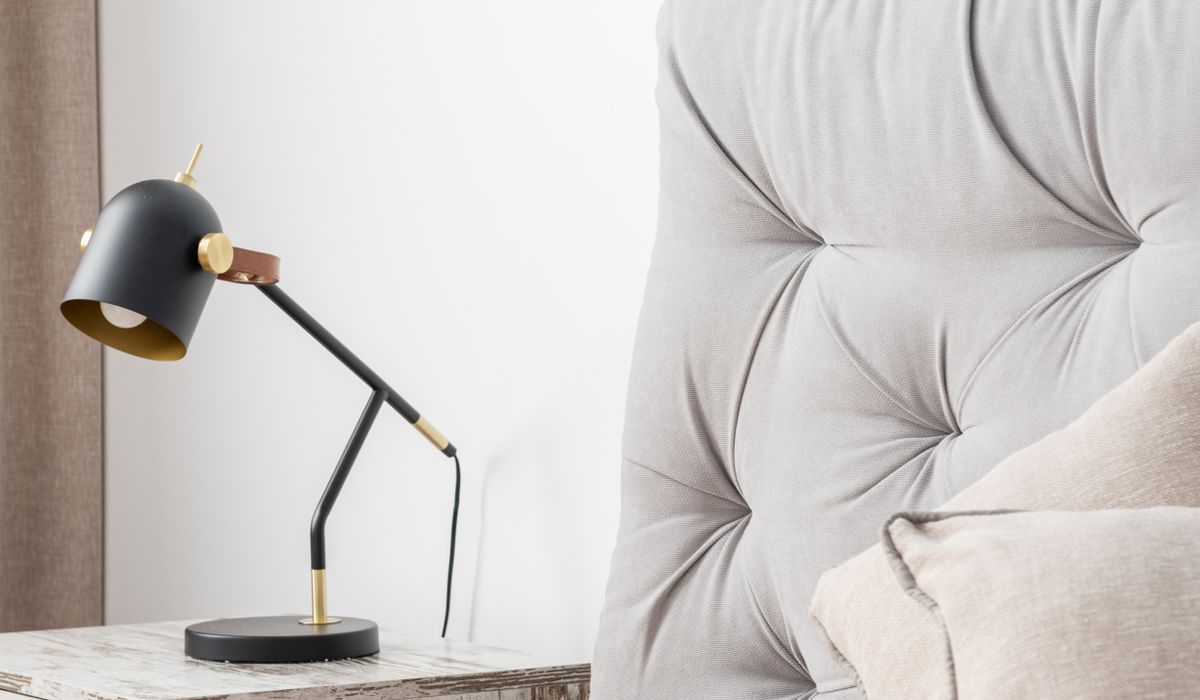
Choosing the Right Lighting for a Home Office
Working from home has a way of exposing every flaw in a room’s lighting. That single overhead pendant might be fine for finding your keys, but it is rarely kind to your eyes or your video calls. The good news is that you do not need a studio budget to get it right. A thoughtful mix of task, ambient, and accent lighting will reduce eye strain, make you look better on camera, and keep the space usable long after the sun goes down.
The problem with relying on one light
Most home offices begin life with whatever light was already in the room. A ceiling fixture casts shadows exactly where you need clarity, and it often reflects harshly off a monitor. If you work in the evening, that same light can feel clinical and unwelcoming. Layering your lighting solves these problems by giving each source a specific job. Think of it like a three-part recipe: task light for focus, ambient light for comfort, and accent light for polish. When they work together, you can dial each one up or down depending on the time of day and what you are doing.
Start with task lighting: light where you work
Task lighting is the workhorse of a home office. Its job is to illuminate your immediate workspace without glaring into your eyes or bouncing off your screen. A dedicated desk lamp is essential, but placement matters more than price. Position the lamp so the light falls onto your desk from the side opposite your writing hand. If you are right-handed, put the lamp on your left, and vice versa. This reduces shadows cast by your hand and keeps the light source out of your direct line of sight.
- Aim for 300–500 lumens at the desk surface for reading and writing. Brighter is not always better; too much light can cause as much strain as too little.
- Choose an adjustable arm or head. You want to point light exactly where it is needed, not flood the whole room.
- Look for a colour temperature around 4000K. That is a neutral white that keeps you alert without feeling harsh. Warmer bulbs (2700–3000K) are better for evening, but they can make you drowsy during the day.
- Check the colour rendering index (CRI). A CRI of 90 or above helps colours look true, which matters if you work with fabrics, paint swatches, or design proofs.
Avoid placing a lamp directly in front of you or behind your monitor, as this creates glare on the screen. If you use a laptop, a small clip-on light or a slim LED bar can work well, but make sure it does not reflect in the webcam.
Add ambient light to soften the room
Ambient lighting fills the gaps and reduces the contrast between your bright desk and the darker corners of the room. High contrast is a common cause of eye strain, because your pupils constantly readjust as you look from screen to wall. You do not need to flood the ceiling with light. Instead, use two or three softer sources around the room. A floor lamp in the corner, a shaded table lamp on a shelf, or even a dimmable wall sconce can lift the overall brightness without creating hotspots.
For a home office, aim for ambient light that is roughly half the brightness of your task light. If your desk lamp is 400 lumens, your ambient sources together might provide 150–200 lumens of soft, diffused light. Dimmable bulbs are invaluable here. During the day, keep ambient light low to save energy and reduce reflections. In the evening, bring it up slightly so the room feels cosy rather than gloomy.
Use accent lighting to flatter video calls
Video calls have their own lighting rules. The camera on your laptop or monitor is not nearly as forgiving as the human eye. A single overhead light will cast shadows under your eyes and nose, while a bright window behind you will turn you into a silhouette. Accent lighting fixes both problems.
- Place a soft light behind your monitor. A small, dimmable lamp or LED strip aimed at the wall behind the screen creates a gentle halo that separates you from the background.
- Add a front-facing fill light. A small ring light or a shaded desk lamp positioned just behind your webcam can even out shadows on your face. Keep it soft and diffused — bare bulbs are unflattering.
- Warm the background. A picture light or a small uplight on a plant or bookshelf adds depth and makes your space look intentional rather than sterile.
Test your setup by opening your webcam app and looking at yourself. Adjust the accent lights until your face is evenly lit and the background has a little warmth. You want to look like you, not like a hostage video.
Keep it flexible for evening use
Your home office probably doubles as a reading nook, a hobby space, or a quiet corner for winding down. That means your lighting needs to shift with the clock. The simplest solution is to put each layer on its own dimmer or smart plug, so you can create scenes. A “daytime” scene might be task light at 100%, ambient at 30%, and accent at 50%. An “evening” scene might drop the task light to 20%, warm the ambient to 2700K, and leave just a soft accent glow.
If you cannot rewire, plug-in dimmers and smart bulbs are affordable and easy to fit. Label your plugs or use a simple remote so you are not fumbling under the desk. The goal is to make adjustment effortless, because the best lighting setup is the one you will actually use.
Practical choices: bulbs, controls, and positioning
When you are ready to buy, focus on a few key details. For task lighting, choose an LED bulb with a colour temperature of 4000K and a CRI of 90+. For ambient and accent lighting, warm white bulbs (2700–3000K) will feel more relaxing. Make sure every bulb is dimmable if you plan to use a dimmer, otherwise you will get flickering or buzzing.
Positioning is just as important as the bulbs themselves. Keep task light close to your work surface, ambient light at least a metre away from your desk, and accent light behind or beside your monitor. Avoid placing any light source directly in your field of view. If you wear glasses, tilt lamps slightly downward to reduce reflections. And do not forget the practical touches: a cable tidy for your new lamps, a spare bulb in a drawer, and a quick dust every few weeks to keep output consistent.
With a little planning, your home office can move from a single harsh bulb to a layered, adaptable space that is kind to your eyes, flattering on camera, and pleasant to work in from morning until night.


Interiors
-
Removable wallpaper, freestanding shelves, and layered textiles allow renters to personalise a space without risking their deposit or damaging the property.

Small Spaces



-

Long established fact that a reader will be distracted
-

Long established fact that a reader will be distracted
-

Long established fact that a reader will be distracted



Styling
Karla Gleichauf
12 May 2017 at 05:28 pm
On the other hand, we denounce with righteous indignation and dislike men who are so beguiled and demoralized by the charms of pleasure of the moment
M Shyamalan
12 May 2017 at 05:28 pm
On the other hand, we denounce with righteous indignation and dislike men who are so beguiled and demoralized by the charms of pleasure of the moment
Liz Montano
12 May 2017 at 05:28 pm
On the other hand, we denounce with righteous indignation and dislike men who are so beguiled and demoralized by the charms of pleasure of the moment